ADF Faces with EJB 3.0 Web services is among famous combination architects are committing to. It has its own winning and loosing grounds over ADFBc.
One of the issues that I found many developers struggle with is refresh of IteratorBinding, especially in scenario when repeated calls are made to same method binding. We found that sometimes, for reason yet to be discovered, iterator is not loaded with the fresh data.
One approach toward this issue is making use of Refresh Property which could be set to various values in drop down like always, default, ifNeeded, never etc. This is declarative approach and you should try it before attempting programmatically.
However if this doesn't works you can try invalidateCache() on the DCIteratorBinding. This too could be set declarative by setting cache result to false.. but some developers didn't had positive experience including me.
Showing posts with label ADF. Show all posts
Showing posts with label ADF. Show all posts
Friday, July 15, 2011

Tuesday, June 14, 2011
ADF, JSF 2.0 and Facelets
Release of Oracle JDeveloper 11.1.2.0 raised many questions on the support of JSF 2.0, Facelets, migration of existing ADF applications. Ofcourse there is no utility yet that could migrate current ADF application directly to the 11.1.2.0 platform but many questions can be answered by Franks article 'JavaServer Faces 2.0 Overview and Adoption Roadmap in Oracle ADF Faces and Oracle JDeveloper 11g'. If you are one interested to learn more on this, you can download the article here.
Saturday, June 11, 2011
How do I get an LOV / Select One Choice label / Display Attribute in bean?
This is one question that I see in forums all the time. You can find other solution of this issue in oracle forum along with my solution which goes as here:
1. Bind af:selectOneChoice to the bean say. testSOCbindings
2. Bind the f:selectItems to the bean say. testSOCSelectItems
3. Use below code:
Integer i = (Integer) getTestSOCbindings().getValue();
List silist = (List) getTestSOCSelectItems().getValue();
String val = silist.get(i.intValue()).getLabel();
1. Bind af:selectOneChoice to the bean say. testSOCbindings
2. Bind the f:selectItems to the bean say. testSOCSelectItems
3. Use below code:
Integer i = (Integer) getTestSOCbindings().getValue();
List
String val = silist.get(i.intValue()).getLabel();
Tuesday, February 15, 2011
Shifting Focus on Page and Popup using Arrow Keys.
Recently I found many threads in forum inquiring about shifting focus on components via arrow keys. There are no build in properties in adf component that can do this. In order to achieved with the combination of ClientListener and JavaScript.
As we know ClientListener can be used to capture the client event and can raise JavaScript function against it and in the function you can shift the focus to any desired components on the UI.
So here is the test case which has two parts:
1. On the page we have two af:commandButtons named as 'Save' and 'Cancel'. Once the focus is on any of the two button we can use Right Arrow Key and Left Arrow Key to shift the focus between then.
2. Same behavior is simulated for the buttons in the popup. This was added to cover one specific issue posted in Oracle forum. In this case a button is provided to launch a popup which contains Dialog. Two commandbutton is dropped inside the toolbar facet. And once the focus is on any of the command buttons they can be shifted using Right and Left Arror Keys.
Here is the javascript code:

and here is the code for the Jspx file:
<?xml version='1.0' encoding='UTF-8'?>
<jsp:root xmlns:jsp="http://java.sun.com/JSP/Page" version="2.1"
xmlns:f="http://java.sun.com/jsf/core"
xmlns:h="http://java.sun.com/jsf/html"
xmlns:af="http://xmlns.oracle.com/adf/faces/rich">
<jsp:directive.page contentType="text/html;charset=UTF-8"/>
<f:view>
<af:document id="d1">
<af:resource type="javascript" source="/javascript/MyJavaScript.js"/>
<af:form id="f1">
<af:panelHeader text="Change Focus on components directly on Page." id="ph1">
<f:facet name="context"/>
<f:facet name="menuBar"/>
<f:facet name="toolbar"/>
<f:facet name="legend"/>
<f:facet name="info"/>
<af:spacer height="30" id="spacer1"/>
<af:commandButton text="Save" id="commandButton1">
<af:clientListener method="shiftFocusToCancel" type="keyUp"/>
</af:commandButton>
<af:commandButton text="Cancel" id="commandButton2">
<af:clientListener method="shiftFocusToSave" type="keyUp"/>
</af:commandButton>
</af:panelHeader>
<af:spacer height="30" id="spacer2"/>
<af:panelHeader text="Change Focus on components on Popup."
id="panelHeader1">
<f:facet name="context"/>
<f:facet name="menuBar"/>
<f:facet name="toolbar"/>
<f:facet name="legend"/>
<f:facet name="info"/>
<af:spacer height="30" id="s1"/>
<af:commandButton text="Click me to launch Popup." id="cb3"
partialSubmit="true">
<af:showPopupBehavior popupId="p1" triggerType="click"/>
</af:commandButton>
<af:popup id="p1">
<af:dialog id="d2" type="none">
<f:facet name="buttonBar">
<af:group id="g1">
<af:commandButton text="OK" id="cb1">
<af:clientListener method="shiftFocusToPopupCancel"
type="keyUp"/>
</af:commandButton>
<af:commandButton text="Cancel" id="cb2">
<af:clientListener method="shiftFocusToPopupOK" type="keyUp"/>
</af:commandButton>
</af:group>
</f:facet>
<af:outputFormatted value="You have got a popup!" id="of1"/>
</af:dialog>
</af:popup>
</af:panelHeader>
</af:form>
</af:document>
</f:view>
</jsp:root>
Calling MethodBinding/WebService on Client Event... by converting it to Server Event .
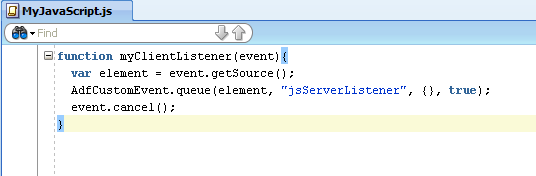
There are so many cases where a method binding and/or web service needs to be called on a client event. When working with ADF rich faces components lots of component do not have properties to capture client event. However ADF does provides ClientListener and ServerListener that can be used to achieve the same. As we know using JavaScript may not be the best solution recommended but when nothing else works, this approach may come handy.
This workaround is extracted from the one of the works by Andrejus in his post related to Custom LOV Type. So in this blog I will to compile how can we do the same. You can download the sample application here.
Test case we are trying to achieve is when user clicks on af:image component we call a bean method and inside this bean method we call a method binding.
1. In an Oracle Fusion Application create a jspx page (say RunMe.jspx). Drag and drop an af:image component on the page. Provide the values for property Source and Short Desc.

2. Right Click on the Web Content folder of the View-Controller project and select New. In the New Gallery wizard select Web Tier, HTML and then select JavaScript Files in Items section and click ok.

3. Add following method to it.

4. Create a bean and add a method to it like below.

5. Register bean to adfc-config.xml as shown.

6. Click on the jspx and go to the Structure window. Drag and drop af:resource inside the af:document and select Type as 'javascript' and for Source provide the name of java script file.

7. Drag and Drop Client Listener and Server Listener inside af:image component and set the property as shown.


8. Run the jspx (RunMe.jspx) and test the server log. Since we just an image when we run the jspx we see something like

Clicking on the image now invokes an client event which is caught by clientListener and which call the Javascript method. This method raises and server event which is caught by ServerListener and which inturn invokes an bean method as handler. Inside this bean we can call webservice/or method binding or perform any logic we want.
Since we just have an system output we can see that bean method is called on the click event.

This workaround is extracted from the one of the works by Andrejus in his post related to Custom LOV Type. So in this blog I will to compile how can we do the same. You can download the sample application here.
Test case we are trying to achieve is when user clicks on af:image component we call a bean method and inside this bean method we call a method binding.
1. In an Oracle Fusion Application create a jspx page (say RunMe.jspx). Drag and drop an af:image component on the page. Provide the values for property Source and Short Desc.

2. Right Click on the Web Content folder of the View-Controller project and select New. In the New Gallery wizard select Web Tier, HTML and then select JavaScript Files in Items section and click ok.

3. Add following method to it.
4. Create a bean and add a method to it like below.

5. Register bean to adfc-config.xml as shown.

6. Click on the jspx and go to the Structure window. Drag and drop af:resource inside the af:document and select Type as 'javascript' and for Source provide the name of java script file.

7. Drag and Drop Client Listener and Server Listener inside af:image component and set the property as shown.


8. Run the jspx (RunMe.jspx) and test the server log. Since we just an image when we run the jspx we see something like

Clicking on the image now invokes an client event which is caught by clientListener and which call the Javascript method. This method raises and server event which is caught by ServerListener and which inturn invokes an bean method as handler. Inside this bean we can call webservice/or method binding or perform any logic we want.
Since we just have an system output we can see that bean method is called on the click event.

Saturday, January 22, 2011
Export Table to Excel.... cannot be that simple !
Recently browsing through Listener Tags in ADF I came across ExportCollectionActionListener. I was surprised to see how easy it is to export the collection of records to excel. If you are new to ExportCollectionActionListener, go on reading rest of article.
Drag and Drap the ExportCollectionActionListener to the Export Button or Menu. In the Insert dialog provide the value for ExportedId which should be pointing to table that needs to be exported.

Use the Edit from the action menu Of ExportedId property. Select excelHTML for Type.

Now select the Listener and go the properties and provide the file name and Title and that’s it. Here is the result:

Sunday, November 21, 2010
Using Oracle Identity Manager’s Java API's from oimclient.jar
Lately I got chance to work on Oracle Identity Manager and I was trying to access Oracle Identity Manager through Java API’s exposed by this product. Ofcourse it’s a great product but at same time it too complicated and I guess experts would agree that it’s so easy for a newbie to get lost in the tons and tons of doc even if complexity is put aside. Well I was lost for sure…
Here is the link for the Oracle's Developer Guide for Oracle Identity Manager if you want to go for detail steps and demo code.
Here I will try to put some steps in simple and straight forward way if you are interested to access OIM’s Java API’s.
There are two entry points for the OIM, one through OIMClient and other through tcUtilityFactory. Well I cannot comment which is the better but from the Doc OIMClient is ofcourse recommended one. One other thing is coming from the Oracle’s Application Development Framework (ADF), I selected JDeveloper as my tool.
There are two entry points for the OIM, one through OIMClient and other through tcUtilityFactory. Well I cannot comment which is the better but from the Doc OIMClient is ofcourse recommended one. One other thing is coming from the Oracle’s Application Development Framework (ADF), I selected JDeveloper as my tool.
- Copy oimclient.zip from OIM Server (OIM_ORACLE_HOME/server/client/ oimclient.zip) to local drive.
- Create a Fusion Web Application using JDeveloper.
- In the model project go the project properties select Run/Debug/Profile, click Default under Run Configurations and click edit.
- Go to the project folder in your JDeveloper Workspace and create two folders as jlib and conf.
- Extract the oimclient.jar to any folder and copy all the jars(OimClient.jar, Commons-logging.jar, Eclipselink.jar and Spring.jar) from it to jlib folder that we created in step 4.
- Copy the authwl.conf file to conf folder created in step 4.
- Go to the project properties for the model project and click on Libraries and Classpath. Click on Add JAR/Directory and add following jars OimClient.jar, Commons-logging.jar, Eclipselink.jar and Spring.jar
- Set the Java Options to
-DXL.HomeDir=PATH\OIM
-Djava.security.auth.login.config=FILE_PATH\conf\authwl.conf - Now it’s time to test the API. Create a sample java class and add following method to it.
public static OIMClient client;
private static String OIMUserName = "USERNAME";
private static String OIMPassword = "PASSWORD";
private static String OIMURL = "t3://OIM_HOSTNAME:OIM_PORT";
private static String OIMInitialContextFactory = "weblogic.jndi.WLInitialContextFactory";
public static void loginWithCustomEnv() throws LoginException {
Hashtable env = new Hashtable();
env.put(OIMClient.JAVA_NAMING_FACTORY_INITIAL, OIMInitialContextFactory);
env.put(OIMClient.JAVA_NAMING_PROVIDER_URL, OIMURL);
client = new OIMClient(env);
client.login(OIMUserName, OIMPassword);
}
public static void main(String args[]) {
try {
loginWithCustomEnv();
} catch (LoginException e) {
e.printStackTrace();
}
} - Right Click and run to test the login.
Saturday, November 20, 2010
OIM Error - java.lang.SecurityException Unable to locate a login configuration
While working with one of the ADF custom application and trying to integrate with Oracle Identity Manager (OIM) using the exposed Java API's from oimclient.jar, I was stuck with below error:
Exception in thread "main" java.lang.SecurityException: Unable to locate a login configuration
at com.sun.security.auth.login.ConfigFile.(ConfigFile.java:93)
at sun.reflect.NativeConstructorAccessorImpl.newInstance0(Native Method)
at sun.reflect.NativeConstructorAccessorImpl.newInstance(NativeConstructorAccessorImpl.java:39)
at sun.reflect.DelegatingConstructorAccessorImpl.newInstance(DelegatingConstructorAccessorImpl.java:27)
at java.lang.reflect.Constructor.newInstance(Constructor.java:513)
at java.lang.Class.newInstance0(Class.java:355)
at java.lang.Class.newInstance(Class.java:308)
at javax.security.auth.login.Configuration$3.run(Configuration.java:246)
at java.security.AccessController.doPrivileged(Native Method)
at javax.security.auth.login.Configuration.getConfiguration(Configuration.java:241)
at javax.security.auth.login.LoginContext$1.run(LoginContext.java:237)
at java.security.AccessController.doPrivileged(Native Method)
at javax.security.auth.login.LoginContext.init(LoginContext.java:234)
at javax.security.auth.login.LoginContext.(LoginContext.java:403)
at Thor.API.Security.LoginHandler.weblogicLoginHandler.login(weblogicLoginHandler.java:58)
at oracle.iam.platform.OIMClient.login(OIMClient.java:134)
at oracle.iam.platform.OIMClient.login(OIMClient.java:114)
at model.SampleOIMClient.loginWithCustomEnv(SampleOIMClient.java:91)
at model.SampleOIMClient.main(SampleOIMClient.java:155)
Caused by: java.io.IOException: Unable to locate a login configuration
as the error seems pretty obvious, it took more than good time to get through a solution.
To get through this error we need to do setting for config file. When using Java API's from oimclient.jar, program looks for authwl.conf and this is what needs to be set as Java Options.
-Djava.security.auth.login.config=FILE_PATH\conf\authwl.conf
If you are using JDeveloper here is how you can set the same:
Go to the project properties and select Run/Debug/Profile

Select 'Default' under Run Configuration and click on Edit. Enter the property as Java Options and click ok.

Once done.. you are good to go..
Exception in thread "main" java.lang.SecurityException: Unable to locate a login configuration
at com.sun.security.auth.login.ConfigFile.
at sun.reflect.NativeConstructorAccessorImpl.newInstance0(Native Method)
at sun.reflect.NativeConstructorAccessorImpl.newInstance(NativeConstructorAccessorImpl.java:39)
at sun.reflect.DelegatingConstructorAccessorImpl.newInstance(DelegatingConstructorAccessorImpl.java:27)
at java.lang.reflect.Constructor.newInstance(Constructor.java:513)
at java.lang.Class.newInstance0(Class.java:355)
at java.lang.Class.newInstance(Class.java:308)
at javax.security.auth.login.Configuration$3.run(Configuration.java:246)
at java.security.AccessController.doPrivileged(Native Method)
at javax.security.auth.login.Configuration.getConfiguration(Configuration.java:241)
at javax.security.auth.login.LoginContext$1.run(LoginContext.java:237)
at java.security.AccessController.doPrivileged(Native Method)
at javax.security.auth.login.LoginContext.init(LoginContext.java:234)
at javax.security.auth.login.LoginContext.
at Thor.API.Security.LoginHandler.weblogicLoginHandler.login(weblogicLoginHandler.java:58)
at oracle.iam.platform.OIMClient.login(OIMClient.java:134)
at oracle.iam.platform.OIMClient.login(OIMClient.java:114)
at model.SampleOIMClient.loginWithCustomEnv(SampleOIMClient.java:91)
at model.SampleOIMClient.main(SampleOIMClient.java:155)
Caused by: java.io.IOException: Unable to locate a login configuration
as the error seems pretty obvious, it took more than good time to get through a solution.
To get through this error we need to do setting for config file. When using Java API's from oimclient.jar, program looks for authwl.conf and this is what needs to be set as Java Options.
-Djava.security.auth.login.config=FILE_PATH\conf\authwl.conf
If you are using JDeveloper here is how you can set the same:
Go to the project properties and select Run/Debug/Profile

Select 'Default' under Run Configuration and click on Edit. Enter the property as Java Options and click ok.

Once done.. you are good to go..
Wednesday, November 10, 2010
Fix for another Auto Suggest Bug .. Suggestion List wipes out the validation
This blog is again to complete my previous blog 'Another Auto Suggest Bug .. Suggestion List wipes out the validation' which points to a bug in functionality of Auto Suggest behavior.
Well Thanks to Oracle, they have fixed the bug but it would be released in Jdev version 11.1.2.0.0.
Well Thanks to Oracle, they have fixed the bug but it would be released in Jdev version 11.1.2.0.0.
Friday, October 22, 2010
Fix for Auto Suggest Bug - Suggestion list renders even when focus is shifted from the field would be available in Jdev 11.1.2.0.0
Well this post is to complete my earlier post regarding the Auto Suggest functionality. To brief post was related to Auto Suggest Bug - Suggestion list renders even when focus is shifted from the field. Bug has been fixed but would be available in Jdev version 11.1.2.0.0. As of today's date its not back ported or should i say I just couldn't convinced Oracle to do so.
Wednesday, August 25, 2010
Test Case : Passing Parameters to Bounded Taskflows using Oracle Dynamic Tab Template
Recently I posted a blog showing what we need to do in addition to the existing code to pass parameters to bounded taskflow in Oracle's Dynamic Tab Template, but from few comments that I received it seems that there are still certain doubts or issue in order to get it working. So here is the test case that explains the stuff.
Test Case:
My test case is very simple, I have a jspx page with Dynamic Tabs Template. It has a link on the navigation area, clicking the link launches a popup that takes two input values. On click of 'OK' it launches the taskflow and passes the input values as taskflow parameter, which is displayed inside the taskflow on a page. Here is the screenshot:


As I said in previous blog we do need to download latest jar for this template which has these functionality added. Download the oracle-page-templates-ext.jar from here Or go to JDeveloper Help -- check for updates. On check for updates wizard, source step (step 2), check 'Official Oracle Extensions and Updates' and click next.

Scroll to find 'Oracle Dynamic Tabs Page Template 1.02', check the option and click on finish to install the extension.

If you have downloaded the jar from my link you need to go to folder where Jdeveloper is installed ......\Middleware\jdeveloper\adfv\jlib. Rename the existing oracle-page-templates-ext.jar to oracle-page-templates-ext.jar.backup. Pasted the jar you just downloaded. If you have downloaded if from 'Check for Updates' then you don't need anything to worry about. Once you have installed the required template, we can go on creating the test case.
For test case, create a new jspx page with using Oracle Dynamic Tab Shell as page Template. Expand the page implementation detail and select radio button for 'Automatically Expose UI components in a New Manage Bean' and provide the details for Name, Class and Package.

Now create a taskflow that needs two taskflow parameters as follows:

Now create a jsff page and drop two input text fields on them. Set there values as value of input parameters, here is the code for the page:

Drop this page on the taskflow and set it as default activity.

Now lets bind the taskflow to the UI shell. Go to UI shell and on the navigation facet drop a popup with Dialog that takes two input text parameter. Also drag and drop a command link and drop an showPopupBehavior that would be used to launch the popup. Here is how it looks into structure window:
 Also here is the how source looks like:

Once we launch the popup and get the input parameter, we will need to pass it too the bounded taskflow that we wanted to do and launch the taskflow itself.
 Associate dialogListener method with the dialog listener property of the dialog which would look like dialogListener="#{backingBeanScope.RunMeBackBean.dialogListener}", we can already see this in the code for jspx page above. One thing that we need to notice is the path of the taskflow passed. It should always be in pattern "/WEB-INF/
/<>TaskflowName>.xml#"
You can also download a test case here.
Test Case:
My test case is very simple, I have a jspx page with Dynamic Tabs Template. It has a link on the navigation area, clicking the link launches a popup that takes two input values. On click of 'OK' it launches the taskflow and passes the input values as taskflow parameter, which is displayed inside the taskflow on a page. Here is the screenshot:


As I said in previous blog we do need to download latest jar for this template which has these functionality added. Download the oracle-page-templates-ext.jar from here Or go to JDeveloper Help -- check for updates. On check for updates wizard, source step (step 2), check 'Official Oracle Extensions and Updates' and click next.

Scroll to find 'Oracle Dynamic Tabs Page Template 1.02', check the option and click on finish to install the extension.

If you have downloaded the jar from my link you need to go to folder where Jdeveloper is installed ......\Middleware\jdeveloper\adfv\jlib. Rename the existing oracle-page-templates-ext.jar to oracle-page-templates-ext.jar.backup. Pasted the jar you just downloaded. If you have downloaded if from 'Check for Updates' then you don't need anything to worry about. Once you have installed the required template, we can go on creating the test case.
For test case, create a new jspx page with using Oracle Dynamic Tab Shell as page Template. Expand the page implementation detail and select radio button for 'Automatically Expose UI components in a New Manage Bean' and provide the details for Name, Class and Package.

Now create a taskflow that needs two taskflow parameters as follows:

Now create a jsff page and drop two input text fields on them. Set there values as value of input parameters, here is the code for the page:

Drop this page on the taskflow and set it as default activity.

Now lets bind the taskflow to the UI shell. Go to UI shell and on the navigation facet drop a popup with Dialog that takes two input text parameter. Also drag and drop a command link and drop an showPopupBehavior that would be used to launch the popup. Here is how it looks into structure window:


Once we launch the popup and get the input parameter, we will need to pass it too the bounded taskflow that we wanted to do and launch the taskflow itself.

You can also download a test case here.
Thursday, August 19, 2010
UI Shell Dynamic Tab: Suppressing required / mandatory field error when navigating between Tabs or creating new Tabs.
Recently I have seen few posts in forum on how to suppress the mandatory / required validation error on attributes so that user can navigate between the tabs, can create new tabs when existing tabs has required or mandatory errors. I tried a test case and it could be downloaded here. In this blog I will try to detail the test case performed.
I created a test application that looks like the image below. Idea is to have two navigation links on the left which would launch their separate taskflow. Everytime I click on it should launch the taskflow in new tab no matter if their are incomplete tabs with missing required values. I should be able to navigate between the open tabs, work on them in any order I want, commit them or rollback them or even reset the inputs I have entered.
 I created a new Jspx page with Oracle Dynamic Tab Shell template. On the Navigation facet I dropped two af:commandLink, set their immediate property to true and associated their action property with bean methods. Code that goes in backing bean is shown later. Here is how code in navigation facet looks like:

I created two jsff pages Page1 and Page2 and dropped view object from data control on to this page as editable form (for model, I used Employees tables provided by HR schema in Oracle database. I created an EO, VO and AM for this table). I also dragged Commit and Rollback from the data control and dropped on each page. Additionally I added a command button and inserted an af:resetActionListener to it.


I created 2 Taskflows, TF1 and TF2 and in their Overview tab set their behavior for their transaction as 'Always Begin New Transaction' and unchecked 'Share data control with calling task flow. Dragged and dropped CreateInsert method as default activity in both the task flows which leads to Page1 and Page2 in Taskflow1 and Taskflow2 respectively. Here are how they look like:


Now in the backing bean of my Jspx page, I have below code:

Just doing so, we can close the tab using the close icon located in the end of the tab even when there are required attribute validation error's on the existing tab, we can reset the errors and values entered on the form using reset button, we can navigate between all the open tabs even with the existing error for required attribute or can open new tab. Have Fun !!
I created a test application that looks like the image below. Idea is to have two navigation links on the left which would launch their separate taskflow. Everytime I click on it should launch the taskflow in new tab no matter if their are incomplete tabs with missing required values. I should be able to navigate between the open tabs, work on them in any order I want, commit them or rollback them or even reset the inputs I have entered.


I created two jsff pages Page1 and Page2 and dropped view object from data control on to this page as editable form (for model, I used Employees tables provided by HR schema in Oracle database. I created an EO, VO and AM for this table). I also dragged Commit and Rollback from the data control and dropped on each page. Additionally I added a command button and inserted an af:resetActionListener to it.


I created 2 Taskflows, TF1 and TF2 and in their Overview tab set their behavior for their transaction as 'Always Begin New Transaction' and unchecked 'Share data control with calling task flow. Dragged and dropped CreateInsert method as default activity in both the task flows which leads to Page1 and Page2 in Taskflow1 and Taskflow2 respectively. Here are how they look like:


Now in the backing bean of my Jspx page, I have below code:

Just doing so, we can close the tab using the close icon located in the end of the tab even when there are required attribute validation error's on the existing tab, we can reset the errors and values entered on the form using reset button, we can navigate between all the open tabs even with the existing error for required attribute or can open new tab. Have Fun !!
Tuesday, August 17, 2010
Passing Parameter to Bounded TaskFlows in UI Shell Dynamic Tabs
Passing parameters to UI shell was one of the genuine requirements and was resolved with some great works by ADF Experts like Richard, Pino, Steve, Chris. There is long history in the development of its solution which could be found in Oracle Forum for ADF UI Patterns & Best Practices.
Initially to get this working we had to customize oracle-page-templates-ext.jar and as far as I know Pino came up with very good blog ADF UI Shell: Extending the UI Shell to Allow Passing of Parameters to Bounded Task Flows that describes this in very detailed steps. Later Oracle logged the bug for this issue and solution was released as an extension as Oracle Dynamic Tab Template.
But now since solution is released we don't need to do any customization and in this blog I would be showing how to achieve this without going through all the pain :)
Before you start, download the latest 'oracle-page-templates-ext.jar' from OTN if you have not already done so. As said before it is available as an extension, so to get this, you can open JDeveloper go to Help - Check for updates.. and install Oracle Dynamic Tab Template'.
From the bean where you are trying to launch the dynamic tab add below code:
Map parameterMap = new HashMap();
parameterMap.put("", );
parameterMap.put("", );
........
// use over loaded _launchActivity method to launch taskflow as dynamic tab.
_launchActivity( "Tab Title" , "TaskFlow with path", false, parameterMap);
that's all needed to be done .....
Recently I found there are still some issues while implementing this.. so I created a blog 'Test Case : Passing Parameters to Bounded Taskflows using Oracle Dynamic Tab Template' detailing all the steps for this and also providing link for a sample test case.
Initially to get this working we had to customize oracle-page-templates-ext.jar and as far as I know Pino came up with very good blog ADF UI Shell: Extending the UI Shell to Allow Passing of Parameters to Bounded Task Flows that describes this in very detailed steps. Later Oracle logged the bug for this issue and solution was released as an extension as Oracle Dynamic Tab Template.
But now since solution is released we don't need to do any customization and in this blog I would be showing how to achieve this without going through all the pain :)
Before you start, download the latest 'oracle-page-templates-ext.jar' from OTN if you have not already done so. As said before it is available as an extension, so to get this, you can open JDeveloper go to Help - Check for updates.. and install Oracle Dynamic Tab Template'.
From the bean where you are trying to launch the dynamic tab add below code:
Map
parameterMap.put("
parameterMap.put("
........
// use over loaded _launchActivity method to launch taskflow as dynamic tab.
_launchActivity( "Tab Title" , "TaskFlow with path
that's all needed to be done .....
Recently I found there are still some issues while implementing this.. so I created a blog 'Test Case : Passing Parameters to Bounded Taskflows using Oracle Dynamic Tab Template' detailing all the steps for this and also providing link for a sample test case.
Sunday, August 15, 2010
Working with af:inputDate in Bean
af:inputDate component register itself as instance of oracle.adf.RichInputDate class and its value attribute accepts java.util.Date type. Details of this component could be obtained at TagDoc.
Date (java.util.Date) itself does not have format, we format its value when we do need to print it. In order to format it in UI you could use af:convertDateTime but if you are thinking how can we do that in bean then here is a sample. Have a method something like below for the value change listener:
public void valuechangelstnr(ValueChangeEvent vce){
java.util.Date dateVal = (java.util.Date)vce.getNewValue();
DateFormat dateFormat = new SimpleDateFormat("dd/MM/yyyy");
String datetime = dateFormat.format(dateVal);
System.out.println("Date Time: " + datetime);
}
In case you want to set a string value to java.util.Date.. here is the sample:
DateFormat dateFormat = new SimpleDateFormat ("yyyy-MM-dd");
java.util.Date date = new java.util.Date ();
String dateStr = dateFormat.format (date);
try{
Date date2 = dateFormat.parse (dateStr);
}catch(ParseException pe){
// do something
}
Friday, August 13, 2010
Instantiating XSLStylesheet object from XSL file.
As we know that ViewObjects can generate and consume XML using method like readXML(Element,int.XSLStylesheet) and writeXML(int,Long, XSLStylesheet). When dealing with XML and View Objects we could use stylesheets to control the format of the XML produced and consumed. In this post I provide an example how to get an instance of stylesheet file to that it can be consumed in ViewObject.
In order to get an instance of XSLStylesheet, create an stylesheet and add it to the project as resource. To do this go to project properties --> Project Source Paths --> Resource. Now add the XSL file to the include list. Doing so makes sure that file will be included when creating a war file for this application.

Now we can instantiate the an object of XSLStylesheet using this files as below:

Making a PLSQL call from AMImpl
Although there are various ways in which you can avoid making a PLSQL call in ADF but when working with legacy system we may need to call a procedure or function from ADF. In this post I am providing a sample method that shows how can we achieve it. Here we are trying to make a call to plsql method 'getEmployeeID' that returns employee number as string based on first name and last name.


Tuesday, August 10, 2010
How to Read resouce bundle values in Managed bean
Resource Bundle could be read in managed bean as below
String BUNDLE_NAME = "path.filename";
ResourceBundle rsBundle = BundleFactory.getBundle(BUNDLE_NAME);
String viewText = rsBundle .getString("Text_Code");
I read in couple of Oracle forums that developers foound issue when they deploy this to standalone weblogic server. If its not working for you on standalone WLS server check if configurations are correct for resource bundle at Project Properties --> Resource Bundle.
String BUNDLE_NAME = "path.filename
ResourceBundle rsBundle = BundleFactory.getBundle(BUNDLE_NAME);
String viewText = rsBundle .getString("Text_Code");
I read in couple of Oracle forums that developers foound issue when they deploy this to standalone weblogic server. If its not working for you on standalone WLS server check if configurations are correct for resource bundle at Project Properties --> Resource Bundle.
How to default data on search criteria.
If we need to default data on search criteria item, we could do so while creating view criteria for eg.
 So at runtime before the query panel renders a search would be made with this default values. Please note that when you reset the values using reset button, it will set the values to the default provided while creating view criteria. At runtime it looks this:


Another Auto Suggest Bug .. Suggestion List wipes out the validation
In my last post about Auto Suggest I was talking about the bugs this behavior has. Found a new bug with this behavior and unfortunately this seems to be more concerning that the one posted before. Here goes the scenario.
In an input text field with the AutoSuggestBehavior enabled and has attribute level validation defined in entity, if building the list takes too long and user enters an invalis value and tabs out of the current field, the validation error is generated but it is then wiped out when the list is displayed.
I logged a Bug 9882151 against Oracle. Good part is, bug has been accepted but development has given it priority 3, which would mean that it may take quite some time for the fix to get released.
Auto Suggest Bug .. Suggestion list renders even when focus is shifted from the field
Auto-suggest is one of the very powerful feature/behavior provided by Oracle ADF and especially when usability is one of the focus. There are so many documents provided that describes the use of Auto-Suggest behavior. One very good article is written by Juan which is available at OTN.
Well, having said that.. there are few bugs too that goes with this feature. One such bug is rendering of the Auto-Suggest list even when we tab out of the field. This came up when I was working on this behavior in one of my previous projects. I reported this to Oracle (Bug 9840607) and good news which I lately found that this should be fixed in the latest version of JDevelper (JDEVADF_MAIN_GENERIC_100721.0058.5748).
Well, having said that.. there are few bugs too that goes with this feature. One such bug is rendering of the Auto-Suggest list even when we tab out of the field. This came up when I was working on this behavior in one of my previous projects. I reported this to Oracle (Bug 9840607) and good news which I lately found that this should be fixed in the latest version of JDevelper (JDEVADF_MAIN_GENERIC_100721.0058.5748).
Subscribe to:
Posts (Atom)